
Roadie: road trip planner & rv
Ori App StudioTravel & Local
4.3111.00 Reviews
- Version
- 1.7.7
- Installs
- 100.00K
- Age Rating
- Everyone
Screenshots
Our Review of Roadie: road trip planner & rv
 Analysis by Appyee
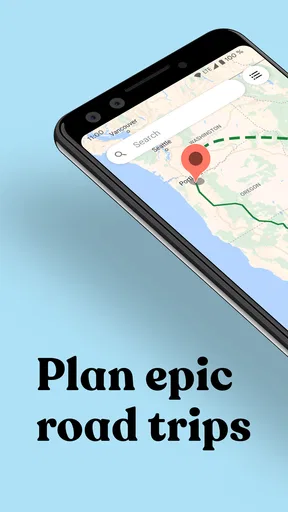
Planning a road trip is easy to romanticize and surprisingly easy to overcomplicate. I like the idea of having one place to think through the route and keep possible stops in view, rather than switching between maps, notes and browser tabs before I have even packed. Roadie: road trip planner & rv is aimed at that planning stage: it helps shape a route, build an itinerary and save points of interest. It is a travel app from Ori App Studio, and its focus is more on organizing a journey than replacing every tool you might use once you are on the road.
Where planning can get stuck
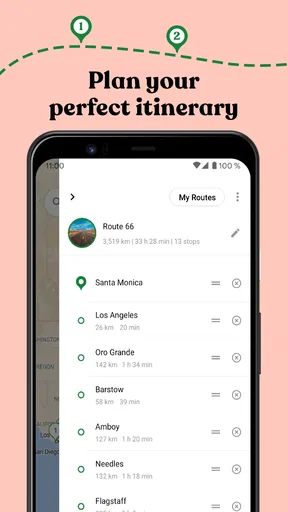
The first hurdle with any trip planner is deciding how much to enter before the plan becomes useful. Start with the parts you already know: your broad route, a few likely stops and the places you genuinely want to visit. I would avoid trying to make a perfect hour-by-hour schedule on the first pass. A road trip changes, and a plan that leaves room to adjust is more practical than one that treats every stop as fixed.
Roadie is most useful when you have several places to connect, not when you only need directions from one address to another. Saving points of interest gives you a way to keep potential stops attached to the trip rather than scattered across searches. If you are still choosing between destinations, it can also help to sketch alternatives and compare the shape of each route before committing.
One thing I would keep in mind is that an itinerary and live navigation are different jobs. A route plan helps you decide where you intend to go; it should not be treated as a guarantee that every turn, road condition or arrival time will remain suitable on the day. I would check current conditions with a navigation option before setting off, especially if the route includes unfamiliar roads or a tight arrival window.
Setup checks before you build the itinerary
Before adding lots of stops, make sure the plan reflects the trip you are actually taking. Check the start and end points, then add only the places that matter to the group. This simple order makes it easier to notice a mistaken destination before it gets buried among optional attractions. For an RV journey, I would be especially careful about independently checking whether a planned stop suits the vehicle; a point of interest being useful to a road trip does not by itself establish that it is appropriate for every RV.
If the app seems confusing at first, take it one step at a time: make a basic route, save a small number of places, and then revisit the itinerary to see whether the layout matches how you think about the trip. The app’s current version is 1.7.7 and it runs on Android 7.0 or later. Roadie is free to install, with in-app purchases listed from $1.49 to $39.99 per item, so I would check the purchase details in the app before paying for anything and decide whether the free experience already covers your planning needs.
Roadie has an average rating of 4.3 from around 2,100 ratings, with roughly 110 written reviews and over 100,000 installs. That gives a prospective user some context about its reach, but I would still judge it by whether its route-and-stop workflow fits the way you travel. It is rated for Everyone, which makes it broadly accessible, though the app is most valuable to people who enjoy planning rather than those who want a route chosen for them automatically.
A practical road-trip workflow
I find a route plan most useful when it separates firm commitments from tempting possibilities. In this section, I’d build the itinerary around the places I must reach, then keep optional stops flexible so a late start or longer meal does not derail the whole day. That distinction also makes it easier to see what needs checking before setting off.
Mapping out the journey
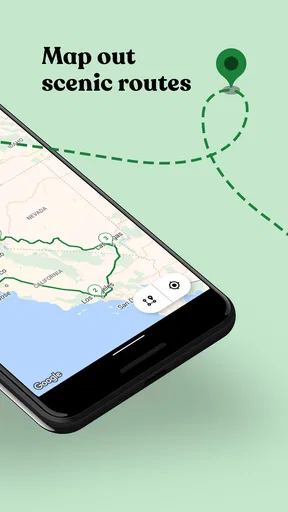
The app’s mapping feature is a game-changer. You can easily plot your route, add stops along the way, and even adjust for scenic detours. It’s like Google Maps, but with a sprinkle of wanderlust. Whether you’re planning a cross-country trek or a weekend getaway, Roadie’s got your back.
Plus, the real-time traffic updates ensure you’re always on the smoothest path possible. No one likes being stuck in gridlock when there are views to be enjoyed and places to be explored.
For a more reliable planning habit, I would treat the route as a working draft. Put essential overnight or meeting points in first, then add optional detours separately in your own notes or by clearly distinguishing them in the itinerary. That gives you a quick way to decide what to drop if a day runs long. It also avoids a common road-trip trap: building a schedule around every appealing stop and leaving no time for meals, breaks or the unexpected.
Finding hidden gems without overloading the day
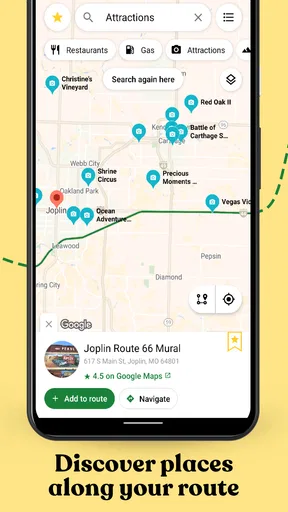
One of the coolest features of Roadie is its ability to help you discover those hidden gems off the beaten path. The app suggests points of interest based on your route, from quirky roadside attractions to breathtaking natural wonders. It’s like having a local guide whispering insider tips into your ear.
And if you’re an RV enthusiast, you’re in for a treat. Roadie provides info on RV-friendly spots, so you can roll up in style and comfort, knowing you’ll have a place to park your home on wheels.
I would use suggestions as a shortlist, not as a promise that each place will be open, accessible or worth a detour on the day. A useful trick is to save more candidates than you expect to visit, then choose a couple once you know how the day is going. For an RV trip, confirm practical details directly with the destination or a current source before changing course; suitability can depend on the vehicle and the specific site, not just the general idea of an RV-friendly stop.
Keeping the trip manageable
Gone are the days of juggling paper maps, guidebooks, and endless browser tabs. Roadie organizes all your trip details in one convenient place. You can keep track of your itinerary, accommodation bookings, and even your budget. It’s like a personal assistant for your travels.
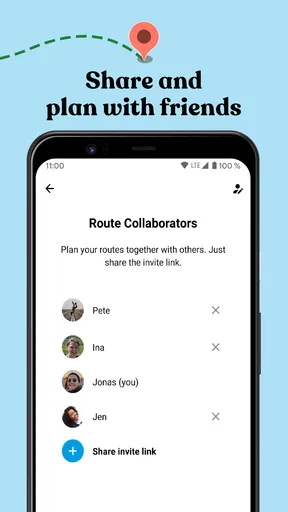
The app also allows you to share your trip plans with friends and family, so they can join in on the fun or just live vicariously through your epic road adventures.
A realistic use case is a weekend drive with a fixed place to stay and a few possible stops on the way. I would put the stay and any must-make appointment first, add nearby points of interest as flexible options, then share the plan with the people travelling with me so everyone can flag what matters. That workflow is less about filling every hour and more about agreeing on priorities before someone is asking from the passenger seat whether the next detour is worth it.
For a longer journey, I would also keep a simple backup note of essential addresses and confirmation details outside the itinerary. That is not a knock on Roadie; it is a sensible travel habit. A trip organizer can keep a plan together, but having key information easy to find elsewhere helps if your phone battery is low or you need to make a quick change while travelling.
When a hiccup is a planning problem—and when it may not be
No app is perfect, right? While Roadie dazzles with its features, there are a couple of areas where it could step up its game. For instance, some users have mentioned occasional glitches with the app’s GPS tracking. But hey, let’s be real, technology can be a bit moody sometimes.
Another point worth mentioning is that while the app offers a wealth of information, it can feel slightly overwhelming for first-time users. A quick tutorial or a more straightforward onboarding process could make a world of difference.
If a route or saved stop does not look right, I would first check the basic inputs: the start and destination, the order of stops, and whether an optional detour has accidentally become part of the main plan. Then close and reopen the app and review the route again before rebuilding everything. If location tracking seems off, check that location access is available to the app and that the phone can get a reliable signal; those are sensible general checks, not proof that the app itself is at fault.
When the map appears to disagree with what is on the road, prioritize road signs and current local guidance. Traffic, closures and access restrictions can change, and a planning app cannot make a closed road passable. If a saved place is difficult to find, search for its exact name separately and verify the address before driving there. These checks help separate a plan that needs correcting from a temporary location or network issue.
The app is not the right fit for everyone. If your main need is turn-by-turn directions for a simple commute, a dedicated navigation app is likely quicker. If you prefer an entirely spontaneous drive and do not want to collect stops or shape an itinerary, Roadie may feel like extra work. I see its stronger use case in the middle: travellers who want a coherent plan but still want freedom to change it.
Who will get the most from it
I would recommend Roadie to people arranging a multi-stop drive, families or friends who need to agree on places to visit, and RV travellers who want to keep route ideas and relevant stops together while checking the details that matter for their vehicle. It can also suit someone who enjoys researching a trip in advance but wants a more organized place for the result than a long list of browser tabs.
Compared with using a general maps app alone, Roadie’s appeal is the trip-planning frame: it encourages you to think about the journey as a sequence of places rather than a single destination. A regular map may be the better choice for immediate directions or quick local searches, while a notes app can be more flexible if you only need a loose checklist. I would use Roadie when the route itself needs thought, and keep a navigation tool available for the driving decisions that happen in real time.
It is also worth being realistic about what “all in one place” means in practice. Keeping an itinerary and travel details together can reduce clutter, but it does not remove the need to verify reservations, opening information or vehicle access. I would use the app to organize decisions, then confirm time-sensitive details with the relevant source. That small extra step is especially useful when a detour would cost a meaningful part of the day.
Final thoughts
If you’re itching to explore and need a trusty co-pilot, give Roadie: road trip planner & rv a whirl. It’s a fantastic tool for both seasoned travelers and newbies alike. The ease of planning, coupled with a treasure trove of insights, makes it a must-have for any road trip.
So, pack your bags, load up the app, and let Roadie guide you on your next adventure. Don’t forget to take the scenic route!
Verdict
Strengths of Roadie: road trip planner & rv
- User-friendly interface simplifies trip planning.
- Extensive database of campsites and attractions.
- Real-time traffic updates enhance navigation.
- Offline maps ensure connectivity in remote areas.
- Customizable itineraries for personalized trips.
Limitations of Roadie: road trip planner & rv
- Limited support for international locations.
- Subscription required for premium features.
- Occasional glitches with GPS tracking.
- Battery drain on prolonged use.
- Some users report slow app updates.
Other Releases by Ori App Studio
View All
TravelSpend: Travel Budget App
Travel & Local4.7
Similar Picks in This Category
View All
Google Maps
Google LLC3.4

Google Maps Go
Google LLC4.1

Booking.com: Hotels & Travel
Booking.com Hotels & Vacation Rentals4.8

Google Earth
Google LLC3.8

Skyscanner Flights Hotels Cars
Skyscanner Ltd4.8

trivago: Compare hotel prices
trivago N.V.4.4
Frequently Asked Questions
What features does Roadie: road trip planner & RV offer for trip planning?
Roadie provides comprehensive trip planning tools, including customizable itineraries, route optimization, and points of interest suggestions. Users can add stops, calculate fuel costs, and receive real-time traffic updates. The app also offers RV-specific features like campground recommendations and clearance alerts, ensuring a smooth and enjoyable road trip experience.
Is Roadie suitable for both short trips and long road journeys?
Yes, Roadie is designed for flexibility, making it ideal for both short day trips and extended road adventures. Its itinerary customization allows users to plan routes that cater to their specific interests and time constraints, while its real-time updates and route optimizations enhance the travel experience regardless of trip length.
How does Roadie assist RV travelers specifically?
Roadie is tailored to the needs of RV travelers by providing features such as RV-friendly route planning, which avoids low bridges and narrow roads. It also suggests suitable campgrounds and rest areas, and offers information on RV services and amenities along the route, ensuring a hassle-free journey for RV enthusiasts.
Can Roadie be used offline, and how reliable is it without an internet connection?
Roadie offers offline capabilities, allowing users to download maps and itineraries before hitting the road. This feature is particularly useful in areas with limited connectivity. While real-time updates require an internet connection, the offline mode remains reliable for navigation and accessing pre-planned routes.
What are the pros and cons of using Roadie compared to other road trip planning apps?
Pros of using Roadie include its RV-specific features, user-friendly interface, and extensive customization options. However, some users may find that the app's premium features require a subscription. Compared to other apps, Roadie excels in catering to RV travelers, though it may have a steeper learning curve for first-time users.
